
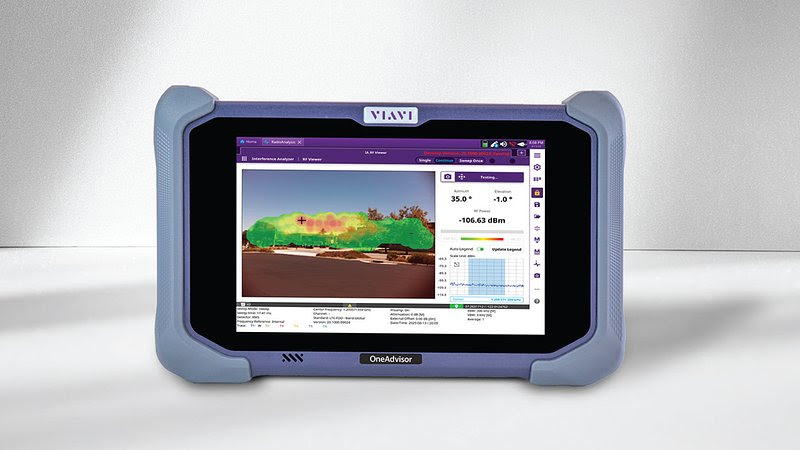
VIAVI Solutions Inc. has pulled the curtain back on something network teams deal with every day but never actually see. Radio frequency signals. With the release of RF Viewer, VIAVI adds Augmented Reality (AR) visualization directly into its OneAdvisor 800 Wireless platform, turning invisible RF behavior into something technicians can point at, measure, and explain in real time.
The announcement, made January 8 from Chandler, Arizona, signals a shift in how RF (radio frequency) analysis is performed in the field. Instead of staring at charts and heat maps after the fact, users now view signal strength and distribution layered onto live video from the device itself. The signal appears where it exists, not where a spreadsheet guesses it might be.
From Numbers on a Screen to Signals in the Real World
RF Viewer was developed in close collaboration with :contentReference[oaicite:0]{index=0}, a detail that matters. This was not built in a vacuum or handed off after a brief demo. Verizon engineers helped shape how the tool behaves in real deployments, where time pressure, safety, and accuracy all collide.
The system overlays RF signal strength data onto a live camera feed. Move the device, and the signal visualization moves with it. Stand near a source, and the intensity changes instantly. Walk away, and the display reacts without delay. The result feels less like analysis software and more like putting on a pair of X-ray glasses for wireless networks.
For technicians tracking PIM (Passive Intermodulation), this matters. PIM occurs when metal objects or loose connections create interference that degrades network performance. Locating the source can feel like chasing a ghost. RF Viewer turns that chase into a guided walk.
Why Verizon Helped Build It
According to Verizon Wireless Associate Director of System Performance Vikramjeet Singh, the collaboration focused on speed and safety. RF Viewer allows teams to locate PIM sources faster and with greater confidence, reducing exposure time and guesswork during field work.
That emphasis on safety is not academic. RF exposure assessments, rooftop deployments, stadium builds, and smart building installations all place people close to active transmitters. Seeing RF emissions instead of inferring them changes how decisions get made on site.
AR Meets RF Analytics
Ian Langley, Senior Vice President of the Wireless Business Unit at :contentReference[oaicite:1]{index=1}, described RF Viewer as a bridge between raw RF data and human perception. That description fits. RF analytics usually demand training, patience, and context. AR removes several of those barriers at once.
The interface does not ask users to interpret dense graphs before acting. It shows what is happening, where it is happening, and how strong it is. Engineers still get the data they expect. Newer technicians get visual confirmation that speeds learning without cutting corners.
What RF Viewer Actually Does
RF Viewer delivers live AR overlays of RF signal strength and spatial distribution. It supports real-time diagnostics for troubleshooting and optimization. It presents those insights through a clean interface that works for seasoned RF engineers and newer field staff alike.
The key point is immediacy. There is no waiting for post-processing. There is no disconnect between environment and measurement. The physical space becomes the data model.
OneAdvisor 800 Wireless Gets Sharper
RF Viewer now lives inside the OneAdvisor 800 Wireless, VIAVI’s integrated wireless test platform used across telecom, enterprise networks, and infrastructure projects. The platform already covers spectrum analysis, interference detection, and transport network validation.
Adding AR visualization extends its role from testing tool to decision aid. Network teams can verify performance, confirm coverage, and explain findings to non-technical stakeholders without translating charts into plain language after the fact.
The platform also supports ongoing shifts toward 5G Advanced and early 6G research. As frequencies climb and deployments densify, spatial awareness stops being a luxury. It becomes table stakes.
Why This Matters Beyond Telecom
RF Viewer targets more than carrier networks. Smart building design, RF safety audits, public venues, military installations, and transportation systems all depend on RF behavior that often stays abstract until something breaks.
By making RF visible, VIAVI lowers friction between planning and execution. Engineers can validate assumptions on site. Safety teams can show exposure zones instead of describing them. Project managers can see coverage gaps without needing a decoder ring.
This is one of those tools that feels obvious in hindsight. Once you see RF overlaid on reality, going back to static charts feels like using a paper map after GPS.
VIAVI has not turned RF work into a video game. It has turned it into something closer to common sense. Seeing what you are measuring changes how fast you act, how confident you feel, and how well teams communicate. That alone makes RF Viewer a meaningful step forward for anyone responsible for wireless performance.